
Authorization
api_key
API key is a secret key for a simplified authorization in Onlinesim API.
How to get an API key:
- Log in to personal account, go to the Profile and click on API tab.
- Copy the key from the
API Keyfield and add it to your application.
How to use it:
All Onlinesim API requests (except for getFreeList) must contain an API key.
API key can be specified as a query parameter, for example:
https://onlinesim.io/api/getTariffs.php?api_key={api_key}
TIP
Using an API key provides a simplified way to authorize requests. We recommend using OAuth 2.0 for more secure data handling.
For detailed information, please refer to the official OAuth 2.0 documentation.
| Property | Value |
|---|---|
| Type | apiKey |
| In | query |
| Name | api_key |
BearerAuth
The API key can also be used for authorization in the request header using the Authorization: Bearer scheme, for example:
bash
Authorization: Bearer {api_key}
User-Agent: PostmanRuntime/7.29.2
Accept: */\*
Cache-Control: no-cache
Postman-Token: 948bc880-8d25-4298-994f-fe6e22ada339
Host: onlinesim.io
Accept-Encoding: gzip, deflate, br
Connection: keep-alive
Cookie: xxxxTIP
Using an API key provides a simplified way to authorize requests. We recommend using OAuth 2.0 for more secure data handling.
For detailed information, please refer to the official OAuth 2.0 documentation.
| Property | Value |
|---|---|
| Type | http |
| Scheme | bearer |
OAuth2
OAuth 2.0
The OAuth 2.0 authorization protocol provides several authorization scenarios, in our case Authorization Code and Implicit Flow types are available.
INFO
For detailed information, please refer to the official OAuth 2.0 documentation.
Authorization URL: https://onlinesim.io/oauth/authorize
Token URL: https://onlinesim.io/oauth/token
Scopes:
sms-scopegrants access to manage numbers for the SMS receiving service from Onlinesim;rent-scopegrants access to renting phone numbers from Onlinesim;free-scopegrants access to using Onlinesim's free numbers.
Register the app in our authorization service
- Open OAuth page
- Add your app by clicking "Create New Client", then fill the fields below:
Name- could be the app name or any other name you and your users will associate with the app;Redirect URL- after user authorization on our server, the client will be redirected with authorization code to this URL.Confidential- (optional), mark the client as Confidential if your application runs on a server and can securely store the Client Secret.
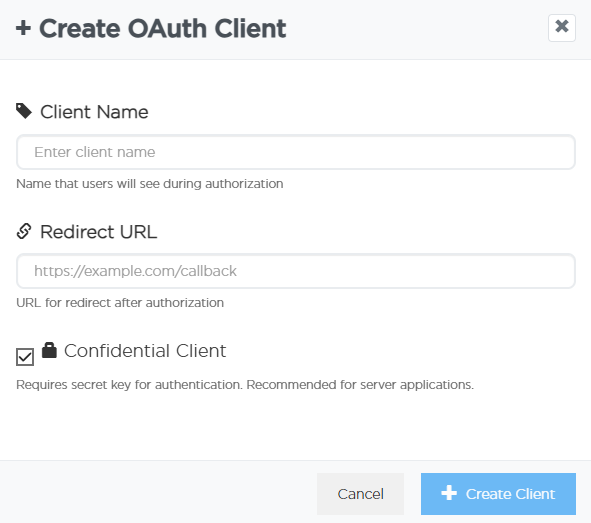
- Click "Create". New client will appear in the list of applications.
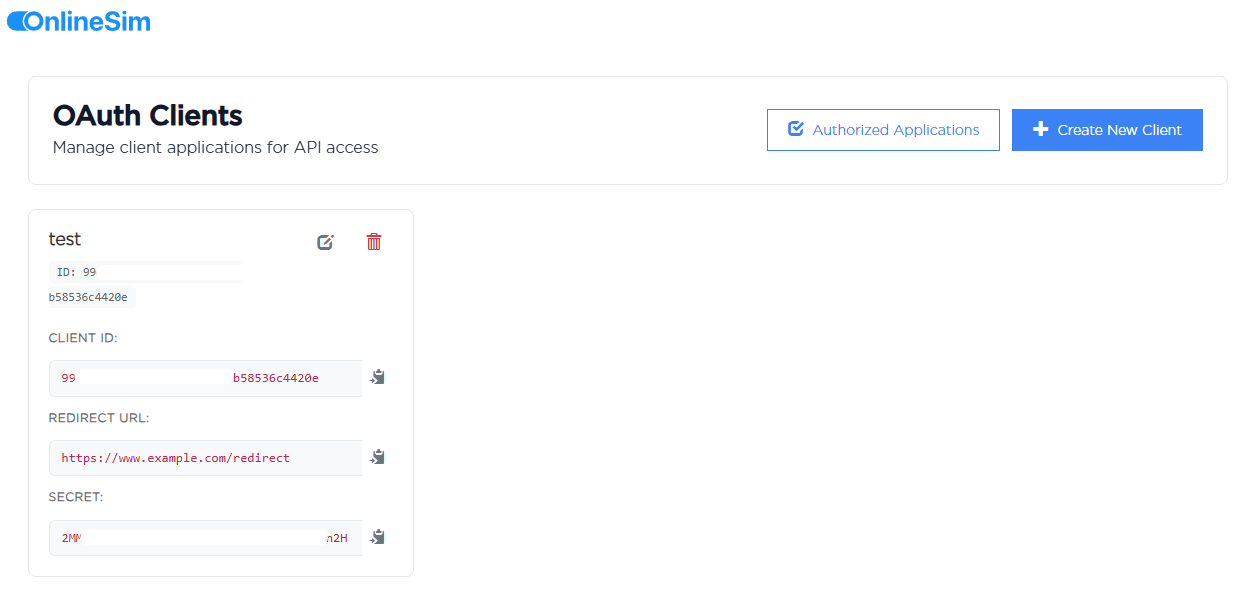
- Save the
Client IDandSecretin a secure location; they will be used by your application for authorization.
OAuth 2.0. Authorization code flow
Authorize a user and get a token
- Authorize a client with a GET request to https://onlinesim.io/oauth/authorize with parameters
client_id,redirect_uri,response_type,scope,state:
Parameter Description
| Parameter Name | Data Type | Description |
|---|---|---|
| client_id | STRING | Client ID (returned when the app registration process is complete) |
| redirect_uri | STRING | Redirect destination for the client after a successful authorization, it must match the value of Redirect URL field you've set during app registration process. |
| response_type | STRING | Use code as a value for Authorization code flow |
| scope | STRING | Access rights that your app asks from the user. Possible values: sms-scope, rent-scope, free-scope. You can specify multiple values |
| state | STRING | A random string for CSRF protection (verify it after the redirect) |
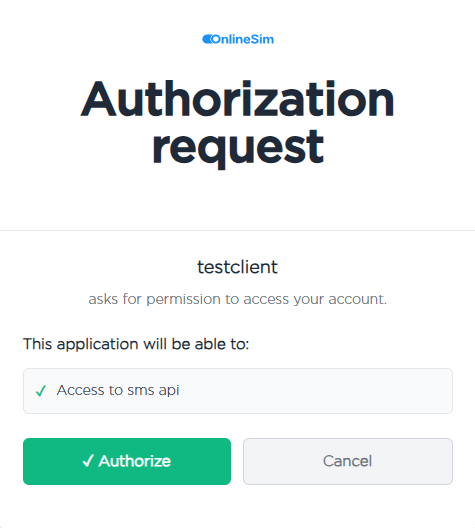
- After the request to https://onlinesim.io/oauth/authorize is sent, the user from your app will be redirected to the authorization page to enter the login and password. If successful, authorize your app to work with user data in the Onlinesim service. To do so, he has to click on the
Authorizebutton:
INFO
At this point, you can check the state parameter, to confirm secure communication with the authorization service
- If the authorization is successful, the user will be redirected to
redirect_uriwith the parametercode. Now you can get theaccess tokenafter making a POST request to https://onlinesim.io/oauth/token:
Parameter Description
| Parameter name | Data type | Description |
|---|---|---|
| grant_type | STRING | Authorization scenario type, use authorization_code when using the Authorization Code flow. |
| client_id | STRING | Client ID (returned when the app registration process is complete) |
| client_secret | STRING | Client_secret (returned when the app registration process is complete) |
| redirect_uri | STRING | Redirect URL for the client after a successful authorization, it must match the Redirect URL parameter used during app registration process. |
| code | STRING | Authorization code, obtained in the previous step |
DANGER
Since client_secret is a private key, it is not recommended to store it in the frontend of the client. For better security, you should store it in the backend of your app. To implement the Authorization Code scenario, you need to pass this code from the frontend to the backend of your service.
- As a result of a successful request to https://onlinesim.io/oauth/token, you get JSON in response, which contains
access_token,refresh_token, andexpires_inattributes. Theexpires_inattribute contains the number of seconds before the access token is expired and therefresh_tokenis used to renew the access token when it expires.
Authorization and token refreshment
For all API requests, add the Authorization: Bearer access_token header. If your request results in ERROR_WRONG_KEY, you need to refresh your token or get a new one.
json
{
  "response": "ERROR_WRONG_KEY"
}To refresh the token you must make a POST request to https://onlinesim.io/oauth/token with the parameters grant_type, client_id, client_secret, and refresh_token. For the refresh_token field, use the value obtained in step 4.
Parameter Description
| Parameter name | Data type | Description |
|---|---|---|
| grant_type | STRING | Use refresh_token as a value |
| client_id | STRING | Client ID (returned when the app registration process is complete) |
| client_secret | STRING | Client_secret (returned when the app registration process is complete) |
| refresh_token | STRING | Refresh_token is obtained along with the access_token. It has a much longer lifetime and is used to refresh access_token |
| code | STRING | Authorization code, obtained in the previous step |
OAuth 2.0. Implicit flow
Authorize a user and get a token
- Authorize a client with a GET request to the endpoint https://onlinesim.io/oauth/authorize with parameters
client_id,redirect_uri,response_type,scope,state:
Parameter Description
| Parameter name | Data type | Description |
|---|---|---|
| client_id | STRING | Client ID (returned when the app registration process is complete) |
| redirect_uri | STRING | Redirect destination for the client after a successful authorization, it must match the Redirect URL parameter used during app registration process. |
| response_type | STRING | Use token as a value for Implicit flow |
| scope | STRING | Access rights that your app asks from the user. Possible values: sms-scope, rent-scope, free-scope. You can specify multiple values |
| state | STRING | A random string for CSRF protection (verify it after the redirect) |
- After the request to https://onlinesim.io/oauth/authorize is sent, the user will be redirected from your app to the authorization page to enter the login & password and, if successful, authorize your app to work with user data in the Onlinesim service. To do so, he has to click on
Authorizebutton:
INFO
At this point, you can check the state parameter, to confirm secure communication with the authorization service
- In case of successful authorization, the user will be redirected to the
redirect_uriaddress with the parameteraccess_token. This token is required for authorization in Onlinesim API.
Authorization of requests to the Onlinesim API
Add to all API requests Authorization: Bearer access_token header. If your request results in ERROR_WRONG_KEY, you should get a new token.
json
{
  "response": "ERROR_WRONG_KEY"
}| Property | Value |
|---|---|
| Type | oauth2 |
OAuth Flows
implicit
- Authorization URL: https://onlinesim.io/oauth/authorize
- Refresh URL: https://onlinesim.io/oauth/token
- Scopes:
sms-scope: grants access to manage numbers for the SMS receiving service from Onlinesimrent-scope: grants access to renting phone numbers from Onlinesimfree-scope: grants access to using Onlinesim free numbers
authorizationCode
- Authorization URL: https://onlinesim.io/oauth/authorize
- Token URL: https://onlinesim.io/oauth/token
- Scopes:
sms-scope: grants access to manage numbers for the SMS receiving service from Onlinesimrent-scope: grants access to renting phone numbers from Onlinesimfree-scope: grants access to using Onlinesim free numbers